Tampilkan postingan dengan label Computer Software. Tampilkan semua postingan

ISO ဖိုင္ကေန USB ထဲကို ေျပာင္းေပးမယ့္ isotousb ေဆာ့၀ဲ

Posted by Unknown Jumat, 31 Januari 2014 0 komentar
Windows အမ်ိဳးမ်ိဳးကို USB မွ တင္နည္းဆိုတဲ့
ပို႔စ္ေလးတစ္ပုဒ္ကို ဒီေနရာမွာ တင္ခဲ့ဖူးပါတယ္

အဲဒီပို႔စ္နဲ႔ ပတ္သက္ၿပီး တခ်ိဳ႕က ၀င္းဒိုးဖိုင္ေတြကို
USB ထဲ ေျပာင္းတဲ့အဆင့္မွာ .. အခက္အခဲရွိေၾကာင္း
mail ထဲကို စာပို႔လာပါတယ္ ..

ဒါေၾကာင္း Windows ေခြကို iso အျဖစ္အရင္ေျပာင္း
ၿပီးမွ အဲဒီ iso ဖိုင္ကို isotousb ေဆာ့၀ဲေလးသံုးၿပီး
ထည့္ေပးလိုက္ရင္ USB ကေန အဆင္ေျပေျပနဲ႔ ၀င္းဒိုး တင္လို႔ရသြားပါလိမ့္မယ္ ..

ကဲ .. လိုခ်င္တဲ့ သူငယ္ခ်င္းမ်ား ေအာက္မွာ ေဒါင္းယူႏိုင္ပါတယ္

Sharebeast Link အတြက္ ဒီမွာ ေဒါင္းပါ

Solidfiles နဲ႔ ေဒါင္းခ်င္ရင္ ဒီမွာ ေဒါင္းပါ

အသံုးျပဳပံုလည္း လြယ္ကူတဲ့အျပင္ Freeware ေလးလည္း ျဖစ္တာေၾကာင့္ Crack စရာမလိုပါဘူး ..

ကဲ .. အဆင္ေျပၾကပါေစဗ်ာ

နည္းပညာလမ္းေၾကာင္းေပၚကသူငယ္ခ်င္းအားလံုးကို ေလးစားခင္မင္လွ်က္
အိုင္တီမုဆိုး

Baca Selengkapnya ....

Facebook Password Extrator ( Facebook Password ၾကည့္တဲ့ေဆာ့၀ဲ)

Posted by Unknown Kamis, 30 Januari 2014 0 komentar
ကၽြန္ေတာ္ဒီေဆာ့၀ဲေလးကို မတင္ေပးခ်င္ပါဘူး

ဒါေပမယ့္ ဘာေၾကာင့္ တင္ေပးလိုက္သလဲဆိုေတာ့
အင္တာနက္ဆိုင္ေတြမွာ Facebook သံုးေနတဲ့
သူငယ္ခ်င္းေတြအေနနဲ႔ သတိထားစရာေလးရွိေအာင္
တင္ေပးလိုက္တာပါ ..

ဒီေဆာ့၀ဲေလးကို စမ္းသံုးၾကည့္ၿပီးရင္ Browser ထဲမွာ ၀င္သံုးထားတဲ့ အေကာင့္တစ္ခုဟာ ဘယ္ေလာက္အထိလံုၿခံဳမႈ အားနည္းတယ္ဆိုတာကို သိၿပီး ရွင္းလင္းစရာရွိတာေတြကို
သတိတရနဲ႔ ရွင္းလင္းထားခဲ့ဖို႔ မေမ့ေစခ်င္လို႔ပါ ..


ကဲ .. လိုခ်င္တဲ့ သူငယ္ခ်င္းမ်ား ဒီမွာ ေဒါင္းယူႏိုင္ပါတယ္ ( Sharebeast Link)

Solidfiles မွာ ေဒါင္းခ်င္ရင္ေတာ့ ဒီမွာ ေဒါင္းပါ

ေဒါင္းၿပီးရင္ ကြန္ပ်ဴတာထဲမွာ Install လုပ္ၿပီး Run လိုက္တာနဲ႔ ေအာက္ကပံုအတိုင္း ပြင့္လာပါမယ္


အဲဒီထဲက  Close ကိုႏွိပ္ေပးလိုက္တာနဲ႔ ကြန္ပ်ဴတာထဲမွာရွိေနတဲ့ အေကာင့္ေတြရဲ႕ user name နဲ႔ password ေတြ က်လာပါလိမ့္မယ္ ...

ကဲ .. အဆင္ေျပပါေစဗ်ာ

နည္းပညာလမ္းေၾကာင္းေပၚက သူငယ္ခ်င္းအားလံုးကို ေလးစားခင္မင္လွ်က္

အိုင္တီမုဆိုး

Baca Selengkapnya ....

Burn Aware Professional 6.9.1 Full Version

Posted by Unknown Rabu, 29 Januari 2014 0 komentar
BurnAware Professional ေနာက္ဆံုးဗားရွင္းေလး
ရလာလို႔ တင္ေပးလိုက္ပါတယ္

ISO ဖိုင္ေတြကို ဘန္းေပးတာမ်ိဳး
Data CD အျဖစ္ ျပန္ထုတ္ခ်င္တာမ်ိဳး စတဲ့
လုပ္ေဆာင္ခ်က္ေတြ ေတာ္ေတာ္မ်ားမ်ားကို
အဆင္ေျပေျပလုပ္ေဆာင္ေပးႏိုင္တဲ့
ေဆာ့၀ဲေကာင္းေလးတစ္ခုဆိုရင္
မမွားပါဘူး ...


သူ႕ရဲ႕လုပ္ေဆာင္ႏိုင္မႈေတြကိုေတာ့ ေအာက္ကပံုေလးကို ၾကည့္ၿပီး
ဆံုးျဖတ္ႏိုင္ပါတယ္ ..


ကဲ .. လိုခ်င္တဲ့ သူငယ္ခ်င္းမ်ား ဒီမွာ ေဒါင္းယူႏိုင္ပါတယ္

ေဒါင္းၿပီးရင္ေတာ့ Setup ဖိုင္ကို Run ၿပီး Install လုပ္လိုက္ပါ

ၿပီးရင္ ပရိုဂရမ္ Run လာတာကို ပိတ္လိုက္ပါ ..

အရင္ဆံုး Crack ဆိုတဲ့ Folder ထဲက msimg32.dll ဆိုတဲ့ဖိုင္ကို C >> Program files >> Burn Aware Professional ဆိုတဲ့ ဖိုဒါထဲကို ကူးထည့္လိုက္ပါ ..

ၿပီးရင္ေတာ့ keygen ဖိုင္ကို Run လိုက္ပါ .. ေအာက္ကပံုအတိုင္း ပြင့္လာပါမယ္ ..


email ေနရာမွာ ႀကိဳက္တာထည့္ၿပီး Generate ကို ႏွိပ္ေပးလိုက္ရင္ Key ထုတ္ေပးပါလိမ့္မယ္ ..
Key ကို Copy ကူးယူၿပီး ပရိုဂရမ္ကို Run လိုက္ပါ ..
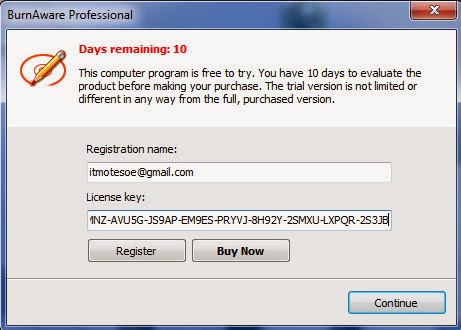
ေအာက္ကပံုအတိုင္း ပြင့္လာပါမယ္


keygen မွာထည့္ခဲ့တဲ့ email နဲ႔ ကူးယူထားတဲ့ Key ကို ထည့္ၿပီး Register ကို ႏွိပ္လိုက္ပါ ( key ထည့္ခ်ိန္မွာ အင္တာနက္ပိတ္ေပးထားပါ )

ဒါဆိုရင္ Full Version အျဖစ္ အသံုးျပဳလို႔ ရသြားပါၿပီ

ကဲ .. အဆင္ေျပၾကပါေစဗ်ာ
နည္းပညာလမ္းေၾကာင္းေပၚကသူငယ္ခ်င္းအားလံုးကို ေလးစားခင္မင္လွ်က္

အိုင္တီမုဆိုး


Baca Selengkapnya ....

Android Application ေရးတဲ့ေဆာ့၀ဲ B4A ေခၚ Basic4Android

Posted by Unknown Kamis, 23 Januari 2014 0 komentar
ဒီေဆာ့၀ဲေလးကိုေတာ့
သူငယ္ခ်င္းေတာ္ေတာ္မ်ားမ်ား
ႀကိဳက္ႏွစ္သက္ၾကလိမ့္မယ္လို႔
ထင္ပါတယ္ ..

ဘာေၾကာင့္လဲဆိုေတာ့
ဒီေန႔ေခာတ္မွာ လူသံုးမ်ားလာတဲ့
Android Application ေတြကို
အလြယ္တကူ ဖန္တီးေရးသားႏိုင္တဲ့
ေဆာ့၀ဲေလးျဖစ္ေနလို႔ပါ

ေဆာ့၀ဲရဲ႕ နံမည္ကေတာ့ Basic4Android ပါ
B4A လို႔ လူသိမ်ားပါတယ္ ..


ဒီေဆာ့၀ဲေလးကို သံုးၿပီး Android Application ေတြကို အလြယ္တကူဖန္တီးေရးသားႏိုင္ပါတယ္
ဘယ္လိုေတြ ေရးသားရမယ္ဆိုတာကေတာ့ ကၽြန္ေတာ္ကိုယ္တိုင္လည္း ေလ့လာေနဆဲမို႔
ျပန္လည္မွ်ေ၀ႏိုင္တဲ့ အဆင့္မေရာက္ေသးတာ နားလည္ေပးေစခ်င္ပါတယ္ ..

ကဲ .. ေဆာ့၀ဲေလးကို လိုခ်င္တဲ့ သူငယ္ခ်င္းေတြက ဒီမွာ ေဒါင္းယူႏိုင္ပါတယ္

ေဒါင္းၿပီးရင္ အထဲမွာ ဖိုင္ႏွစ္ဖိုင္ပါပါတယ္ ..
အရင္ဆံုး b4a full.exe ဖိုင္ကို Run ၿပီး Install လုပ္ေပးပါ ..
Install လုပ္ၿပီးတဲ့ ေနာက္ဆံုးအဆင့္မွာ ေအာက္ကပံုအတိုင္း ျဖစ္ေနပါမယ္ ..


Launch Basic4Android ေရွ႕ကအမွန္ျခစ္ေလးကို ျဖဳတ္ၿပီးမွ Finish ကို ႏွိပ္ပါ
Full Version ျဖစ္ေအာင္ Crack ရဦးမွာမို႔ပါ

ၿပီးရင္ Antivirus ေတြကို ခဏပိတ္ထားပါ
b4a gen.exe ဆိုတဲ့ keygen ဖိုင္ေလးကို C >> Program files >> Anywhere Software >> Basic4Android ဆိုတဲ့ ဖိုဒါထဲကို အဆင့္ဆင့္ ဖြင့္၀င္ၿပီး ကူးထည့္ေပးလိုက္ပါ
ၿပီးရင္ ကူးထည့္လိုက္တဲ့ b4a gen.exe ဖိုင္ကို Run လိုက္ပါ
ေအာက္ကပံုအတိုင္း ပြင့္လာပါမယ္ ..


email ထည့္ရမယ့္ အကြက္ထဲမွာ ထည့္ခ်င္တဲ့ email ကို ထည့္ေပးလိုက္ပါ ( တကယ္ရွိစရာမလိုပါဘူး)
ၿပီးရင္ Generate license file ကို ႏွိပ္ေပးလိုက္ရင္ ေအာက္ကပံုအတိုင္း ပြင့္လာပါမယ္ ..


OK ကို ႏွိပ္ေပးလိုက္ပါ ..

ၿပီးရင္ Desktop ေပၚက Basic4Android program ကို ဖြင့္လိုက္ပါ ..
တခ်ိဳ႕စက္ေတြမွာ email ထည့္ရမယ့္ Box ေလးတက္လာပါမယ္ .. keygen တုန္းကထည့္ခဲ့တဲ့ email ကိုပဲ ျပန္ထည့္ေပးလိုက္ရင္ Full Version ျဖစ္သြားပါၿပီ
တခ်ိဳ႕စက္ေတြေတာ့ ဘာ Box မွ တက္မလာပဲ Full Version ျဖစ္သြားပါတယ္ ..
Help ဆိုတဲ့ထဲက About ကိုႏွိပ္ၾကည့္လိုက္ရင္ Registered Version ဆိုတာကို ေတြ႕ရပါလိမ့္မယ္ ..

အဲ .. တစ္ခု ျဖည္စြက္ၿပီး ေျပာခ်င္တာက B4A ကို သံုးၿပီး Android Application ေတြ ဖန္တီးေရးသားမယ္ဆိုရင္ SDK ဆိုတာေလးလည္း
စက္ထဲမွာ Install လုပ္ထားမွ အဆင္ေျပပါတယ္ ..
အဲဒီ SDK ကို Install မလုပ္ရေသးဘူးဆိုရင္ေတာ့ ဒီေနရာ ကို သြားလိုက္ပါ
ေအာက္ကပံုအတိုင္း ပြင့္လာပါမယ္


 Java Download ဆိုတဲ့ေနရာကို ႏွိပ္ပါ
ေအာက္ကပံုအတိုင္း ပြင့္လာပါမယ္


Accept Locense Agreement ေရွ႕မွာ အမွတ္ကေလး ထည့္ေပးၿပီး ေအာက္မွာ ကိုယ့္၀င္းဒီးအမ်ိဳးအစားကို လိုက္ၿပီး ေဒါင္းယူ Install လုပ္ရမွာျဖစ္ပါတယ္


ကဲ ... အဆင္ေျပၾကပါေစဗ်ာ

နည္းပညာလမ္းေၾကာင္းေပၚက သူငယ္ခ်င္းအားလံုးကို ေလးစားခင္မင္လွ်က္

အိုင္တီမုဆိုး

Baca Selengkapnya ....

ကြန္ပ်ဴတာ Screen ေပၚကပံုရိပ္ေတြကို မွတ္တမ္းတင္ေပးမယ့္ FastSton Capture

Posted by Unknown Minggu, 19 Januari 2014 0 komentar

ေတာင္းထားလို႔ တင္ေပးလိုက္ပါတယ္ ..

ကၽြန္ေတာ္ သံုးဖူးသမွ်ထဲမွေတာ့
အႏွစ္သက္ဆံုးနဲ႔ လက္ရွိလည္း အသံုးျပဳေနတဲ့
ေဆာ့၀ဲေကာင္းေလးျဖစ္ပါတယ္

ဒီေဆာ့၀ဲေလးဟာ ဖိုင္ဆိုဒ္ေသးငယ္ေပမယ့္
လုပ္ေဆာင္ႏိုင္မႈအလြန္ကို ျမင့္မားတာကို ေတြ႕ရပါတယ္

ဒီေဆာ့၀ဲေလးကို သံုးၿပီး ကြန္ပ်ဴတာ Screen ေပၚက


ပံုေတြကို Screen တစ္ခုလံုးကို ျဖစ္ျဖစ္ ကိုယ္ႏွစ္သက္တဲ့ ေနရာ အကြက္အကြင္းေလးကို ျဖစ္ျဖစ္ ပံုေသအျဖစ္  ရိုက္ယူႏိုင္သလို လႈပ္ရွားမႈေတြကိုပါ ပံုရွင္အျဖစ္ မွတ္တမ္းတင္ထားႏိုင္ပါတယ္


Full Version အျဖစ္ အသံုးျပဳႏိုင္ေအာင္ Keygen ဖိုင္ေလးပါ ထည့္ေပးထားပါတယ္
setup ဖိုင္ကို Install လုပ္ၿပီး ပထမဆံုးအႀကိမ္ Run တဲ့အခါ user name နဲ႔ Serial key ေတာင္းမွာ ျဖစ္ပါတယ္

ထည့္ရမယ့္ User name ကို Keygen ထဲမွာ လိုသလို ထည့္သြင္းၿပီး Serial Key ကို ထုတ္ယူထည့္သြင္းေပးလိုက္ရံုပါပဲ

လိုခ်င္တဲ့သူငယ္ခ်င္းမ်ား ဒီမွာ ေဒါင္းယူႏိုင္ပါတယ္

ကဲ .. အားလံုးအဆင္ေျပၾကပါေစဗ်ာ

နည္းပညာလမ္းေၾကာင္းေပၚကသူငယ္ခ်င္းအားလံုးကို ေလးစားခင္မင္လွ်က္

အိုင္တီမုဆိုး

Baca Selengkapnya ....

Stardock WindowBlinds v8.02 + Activator

Posted by Unknown Kamis, 16 Januari 2014 0 komentar
http://fc00.deviantart.net/images2/i/2004/08/8/d/Windowblinds_8.jpg

အခုတစ္ခါမွာေတာ့ မိမိကြန္ျပဴတာ တစ္ခုလံုးကိုအလွဆင္ေပးမယ့္ Software ေလးတစ္ခုကိုတင္ေပးလိုပါ တယ္ဗ်ာ။ Android အတြက္ ေတြဘဲအလွဆင္တာေတြ တင္ေပးေနတာမ်ားေတာ့ အခု PC ဘက္ကို ျပန္လည့္ တာပါ။ သူ႕ရဲ႕ Skin ေလးကေတာ္ေတာ္ေလးလွပါတယ္ဗ်ာ။ နမူနာအေနနဲ႕ေအာက္မွ ပံုေတြျပထားပါတယ္။ Support လုပ္ႏိုင္တဲ့ OS ေတြကေတာ့ Windows 7/8 and Windows Server 2008 R2/2012. အားလံုးမွာအလုပ္ လုပ္ပါတယ္။ XP မွာေတာ့ မရပါဘူးဗ်ာ။ အျမဲတမ္းသံုးႏုိင္ေအာင္ Trial Reset ကိုထည့္ေပးလိုက္ပါတယ္။ ျပဳ လုပ္ပံုကလည္းလြယ္ပါတယ္။ ေအာက္မွာၾကည့္လိုက္ပါဦး။


1. "Stardock WindowBlinds 8.02". ကို Install လုပ္လုိက္ပါ။

 2. ျပီးသြားရင္ေတာ့ သူ႕ကို ပိတ္ထားလိုက္ပါ မ Run ပါနဲ႕ဦး။

 3. "Trial Reset.exe" ကိုႏွိပ္လုိက္ပါ ျပီးသြားရင္ "Auto Reset" ကိုႏွိပ္ေပးလိုက္ပါ။ ဒါဆိုရင္ Full Version ျဖစ္ သြားပါျပီ။ အဆင္ေျပပါေစေနာ္။

http://draginol.stardock.net/images/islanddog/Test-Post_9104/wb_win7_lantana.png

http://vsetut.at.ua/rizne/fe3803a1bf3d.jpg

http://s19.postimg.org/ced1wshk3/image.jpg 

http://soft-best.net/uploads/posts/2012-12/1355848648_windowblinds.v7.4.screenshot.jpg


 **  Step-1.ေအာက္က Download Button ကိုႏွိပ္လိုက္ပါ  

**  Step-2. "5sec". ေလာက္ေစာင္႕ေပးပါ။

**  Step-3. "  << SKIP AD >>   ".ကိုႏွိပ္ေပးပါ။

**  Step-4. Download Link က်လာပါလိမ္႕မယ္။

**  အဆင္ေျပပါေစဗ်ာ။


Baca Selengkapnya ....

Madcrosoft PC TuneUp Tools 2014 8.1.005 with Key

Posted by Unknown Senin, 06 Januari 2014 0 komentar
http://image.asandownload.com/software/utilities/optimizer/Madcrosoft-PC-TuneUp-Tools.jpg

ပထမအၾကိမ္တင္ေပးတုန္းက အေတာ္ေလးကို လူၾကိဳက္မ်ားျပီး ေဒါင္းတဲ့သူအေတာ္မ်ားခဲ့ပါတယ္။ အခု Version အသစ္ထြက္လာလို႕ထပ္ျပီးတင္ေပးလိုက္ပါတယ္ဗ်ာ။ ကြန္ျပဴတာတစ္လံုးမွာရွိထားသင့္တဲ႕ Software ေလးတစ္ခုတင္ေပးလိုက္ပါတယ္ဗ်ာ။ Microsoft ကေနထုတ္ တဲ႕ Madcrosoft PC TuneUp Tools 2014 ေနာက္ဆံုးထြက္ Version ျဖစ္ပါတယ္။ PC TuneUp Toos ကိုေတာ့ လူတိုင္းနဲ႕ ရင္းႏွီးျပီးသားလို႕ယူဆတဲ႕အတြက္ အေသးစိတ္မရွင္းျပေတာ့ပါဘူး Madcrosoft PC TuneUp Tools ကေတာ့ ကြန္ျပဴတာအတြက္အသံုးတည့္ေစမယ့္ Tools ေပါင္း 8မ်ိဳးပါ၀င္ပါတယ္။ Microsoft ကေန သူ႕ရဲ႕ OS အတြက္ထုတ္ တာဆုိေတာ့ အျခားေသာ TuneUP ေတြထက္ ပိုျပီးေကာင္းမယ္ဆိုတာ သိၾကမွာပါ။ သူ႕မွာပါ၀င္တဲ႕ Tools တစ္ခုခ်င္းစီနဲ႕ လုပ္ေဆာင္ခ်က္အေသးစိတ္ေတြကိုေတာ့ေအာက္မွာ မူရင္းအတိုင္း ရွင္းျပေပးထားပါတယ္ဗ်ာ။ Full Version အျဖစ္ Serial Key ကိုလည္းထည့္သြင္းေပးလိုက္ပါတယ္ဗ်ာ။

PC TuneUp Tools offers advanced PC Tuning software that is simple to use. If your computer is running slowly, PC TuneUp Tools can bring it back to speed in just a matter of minutes. Just install, scan and fix. Not only does PC TuneUp Tools repair errors on your PC, it removes junk files that just take up space and slow down your computer. Get back that hard drive space needed to make your PC run smoothly. PC TuneUp Tools FeaturesRegistry Cleaner
The ultimate Registry Cleaner removes unwanted fragments left by uninstalled and software products within your system’s Registry.
Privacy Cleaner
Privacy Cleaner can remove all your browsing history with the click of one button.
Restore Point Cleaner
Restore Point Cleaner This process its self could free up between 500mb to 5 GB of hard disk space.
Windows Prefetch Cleaner
Just like the TEMP directory on your system, the Prefetch folder can fill up with lots of unused entries and take up needed space.
Hard Drive Cleaner
Hard Drive Cleaner The removal of unwanted files and folders clogging up your Windows OS.
File Encrypter
File Encrypter Safeguard important documents on your PC. Password protects any file with an unbreakable encryption algorithm.
File Shredder
File Shredder program can eliminate personal and private files that you need to be removed from your personal PC
Startup Manager
Make Windows boot faster by managing what loads when you switch on your PC


 **  Step-1.ေအာက္က Download Button ကိုႏွိပ္လိုက္ပါ  

**  Step-2. "5sec". ေလာက္ေစာင္႕ေပးပါ။

**  Step-3. "  << SKIP AD >>   ".ကိုႏွိပ္ေပးပါ။

**  Step-4. Download Link က်လာပါလိမ္႕မယ္။

**  အဆင္ေျပပါေစဗ်ာ။


Baca Selengkapnya ....

Internet Connection Speed & PC ရဲ႕ Speed ကိုျမွင့္တင္ေပးမယ့္ AusLogics BoostSpeed v6.4.1.0 + Key & Crack

Posted by Unknown Kamis, 26 Desember 2013 0 komentar
http://www.bestbuildpc.org/uploads/image/Auslogics-Defrag.jpg

Auslogics BoostSpeed ဆိုတဲ႕ စြယ္စံုသံုး Maintenance Tool ကိုေတာ့ ေတာ္ေတာ္မ်ားမ်ားရင္းႏွီးၾကမယ္လို႕ ထင္ပါတယ္ဗ်ာ။ မိမိရဲ႕ ကြန္ျပဴတာအတြက္ အသံုးတည့္ေစမယ့္ Tools ေပါင္း 13မ်ိဳးအထက္ပါ၀င္ပါတယ္ဗ်ာ။ Disk Defrag , Internet Optimizer , Tweak Manager , Duplicate File Finder , File Shredder , Disk Wiper , Startup Manager , Uninstall Manager , Service Manager , Task Manager , System Information , Rescue Center , Browser Manager စတဲ႕ Tools ေတြပါ၀င္ပါတယ္။ ရင္းႏွီးျပီးသားကေတာ့ အေပၚမွာေျပာျပခဲ႕တဲ႕ Feature ေတြကိသိႏိုင္ပါတယ္။ မသိေသးသူမ်ားအတြက္လည္း Tools တစ္ခုခ်င္းရဲ႕ လုပ္ေဆာင္ခ်က္အေသး စိတ္ကိုရွင္းျပေပးထားပါတယ္ဗ်ာ။


AusLogics BoostSpeed - the ideal solution to keep your PC running faster, cleaner and error-free. This powerful optimization suite will boost Internet connections, tweak Windows to its peak performance, clean registry and block annoying ads. It's a great way to keep your computer clean and optimized.

Speed Up PC With BoostSpeed
Modify Windows settings, file system and services to greatly increase system performance. Increase startup and shutdown speed, disable annoying CD autorun and error reporting features. BoostSpeed will keep monitoring your system for possible optimizations and let you know if such optimizations are possible. You can also run the System Optimization Wizard to periodically optimize your PC.

Speed Up Internet
Adjust your PC for faster images, music and software downloads, increased browsing speed and reliable Internet connections. View your download speed and graphs. To gain additional performance boost you can also turn on DNS Optimization.

Block Banner Advertisements
Tired of annoying banner advertisements accompanying many web sites? Now you can eliminate advertisements and also speed up your Internet browsing with BoostSpeed Banner Killer! You can add your own web sites to the black list to block them from showing their advertisements.

Keep Disk and Registry Clean
Get rid of junk on the disks and registry of your PC. Remove hazardous and space-wasting files left by untidy programs and crashes of your system. Dramatically increase the performance of your PC by cleaning, optimizing and defragmenting local disks and registry.

Optimize Memory and Appearance
Badly written applications constantly steal memory without giving it back. That's why your PC becomes unstable with time and you have to reboot. BoostSpeed automatically frees up computer memory to gain additional performance boost. You can also manually recover memory and clipboard.

Keep your PC fast and safe
BoostSpeed will detect most of the popular "PC-slowers" - bundle-software (such as eDonkey or Kazaa) which silently download malware and spyware to your computer, taking up internet traffic and slowing down the system. This will also keep your system safe from prying eyes of spyware programs.

Boost Software Products
BoostSpeed can improve performance of different software products, including Microsoft Office, Internet browsers (such as Internet Explorer, Opera, Mozzila), E-mail clients (Outlook, The Bat), MSN Messenger, ICQ, Media Player and others.

System Optimization Tools
Greatly increase your PC startup speed with Autorun Manager, where you can disable or remove the programs which try to load up when Windows starts up. Force-uninstall unwanted software products which take up space on your computer and slow it down.

Networks Tools
Keep your connection alive while you're away, synchronize your computer clock with atomic clock over the Internet, lookup domain names and IP addresses, measure your Internet connection speed. Troubleshoot and improve your Internet connection and local network with an excellent selection of network management tools.

OS : Win 8 (32 or 64 bit), Win 7 (32 or 64 bit), Vista SP2 (32-bit only), XP SP3 (32-bit only)

Language : English


 **  Step-1.ေအာက္က Download Button ကိုႏွိပ္လိုက္ပါ  

**  Step-2. "5sec". ေလာက္ေစာင္႕ေပးပါ။

**  Step-3. "  << SKIP AD >>   ".ကိုႏွိပ္ေပးပါ။

**  Step-4. Download Link က်လာပါလိမ္႕မယ္။

**  အဆင္ေျပပါေစဗ်ာ။


Baca Selengkapnya ....

TuneUp Utilities 2014 v14.0.4000.179 + Key

Posted by Unknown Sabtu, 14 Desember 2013 0 komentar

TuneUp Utilities ဆိုတာကေတာ့ နာမည္ၾကီးျပီးသား Optimizer တစ္ခုပါ။ အခုလည္းေနာက္ဆံုးထြက္ Version ကိုတင္ေပးလုိက္ပါတယ္ဗ်ာ။ အျမဲတမ္းသံုးႏိုင္ေအာင္ Serial Key ကိုပါထည့္သြင္းေပးလိုက္ပါတယ္ဗ်ာ။ ကြန္ျပဴတာတစ္လံုးအတြက္ တကယ့္ကိုအသံုးတည့္ေစမယ့္ Tool ေပါင္းမ်ားစြာကိုစုစည္းေပးထားတာျဖစ္ ပါတယ္ဗ်ာ။ အခုေနာက္ဆံုးထြက္လာတဲ့ Version အသစ္မွာေတာ့ Windows 8.1 (32 and 64-bit) အထိပါ Support လုပ္ေပးႏိုင္လာပါတယ္။ Windows ® 2003, Windows XP, Windows Vista, Windows 7, Windows 8 စတာေတြအားလံုးမွာအလုပ္လုပ္ပါတယ္ဗ်ာ။ အေသးစိတ္ကိုေတာ့ေအာက္မွာေလ့လာႏိုင္ပါတယ္ဗ်ာ။

TuneUp Utilities 2014 - An updated set of various tools for tuning your system. TuneUp Utilities allow you to clean the wheels of a different litter, remove from the registry invalid entries, manage startup to optimize memory, permanently delete files using the tool "TuneUp Shredder" (it is not possible to restore files, even with special programs), to change the appearance of Windows, and much more. All utilities are collected in a single graphical environment. This package contains the important functions for the configuration, optimization of the system, cleaning and maintenance-friendly graphical interface.

TuneUp stands out due to its ease of use. During development, the main emphasis was placed on providing opportunities for each level Windows users to optimize their computer efficiently and completely. The following is a brief overview of the most important new features:
TuneUp Turbo Mode. TuneUp Turbo Mode gives you immediate performance boost whenever you need it. It disables many features that work in the background, even when you are not using them.
TuneUp Operational Optimization . TuneUp Utilities offer you two new optimization method, which ensures optimum performance even under high load computer. If necessary, the speed will increase or accelerate the process of running the program.
Gadget TuneUp Utilities. For Windows Vista and Windows 7, there is now a device TuneUp Utilities, which always displays the status of the computer desktop.
TuneUp Optimization Report. TuneUp Utilities will provide you with progress reports will show you what services and other optimization problems you have done and what benefits it has brought you.
The main window. TuneUp Utilities have been completely renovated: new main window is even easier to use and provides faster access to each function.
Adapting to Windows 7. TuneUp Utilities fully supports the new operating system Windows 7. Just like Windows XP and Vista. TuneUp Utilities also performed on 64-bit versions of Windows 7.
Even more extensive options Automatic Maintenance. Automatic service and fast solution to the problems now do more maintenance tasks. You can also specify a starting automatic maintenance when you are not actively working in the computer and - (laptop) - when it is connected to a power source.
Disk defragmenter. The new TuneUp Utilities is now offering you two ways to defragment your hard drive: full and fast.
More defrag registry. The previous version of the registry was supposed to be defragmented after analysis at reboot. The new TuneUp Utilities, you can now put this optimization to the next start your computer, and you can not interrupt their work for this.
When space became even more secure. You can now delete unwanted files and old backups separately from each other in order to free up disk space on your hard drive. This allows you to safely remove redundant files at any time. After each treatment, TuneUp Utilities also show you how much disk space has been freed.
Easier to use. Many functions of TuneUp Utilities have become more easy to use, making it easier for you to optimize your system Windows.
Detailed information about your programs. TuneUp Utilities provides you with a detailed description of all programs installed on your computer. If you would like to find out more information about one of your programs, you can get search results on the network.

Supported Platforms :

Windows ® 2003, Windows XP, Windows Vista, Windows 7, Windows 8, Windows 8.1 (32 and 64-bit)
Language: English

Homepage: http://www.tune-up.com/


**  Step-1.ေအာက္က Download Button ကိုႏွိပ္လိုက္ပါ  

**  Step-2. "5sec". ေလာက္ေစာင္႕ေပးပါ။

**  Step-3. "  << SKIP AD >>   ".ကိုႏွိပ္ေပးပါ။

**  Step-4. Download Link က်လာပါလိမ္႕မယ္။

**  အဆင္ေျပပါေစဗ်ာ။


Baca Selengkapnya ....

PC မွာသံုးဖို႕ Mouse Cursor လွလွေလးမ်ား - Stardock CursorFX Plus v2.11 Incl Keymaker + Patch

Posted by Unknown Rabu, 11 Desember 2013 0 komentar
http://i1154.photobucket.com/albums/p529/ssteam/d3fa172f3efdff07cf8e82fce2282e4b51d.jpg

ကြန္ျပဴတာေပၚမွာ Mouse Cursor ေလးကို သူမ်ားေတြနဲ႕မတူဘဲ အလန္းဇယားေလးေတြနဲ႕ အသံုးျပဳခ်င္သူ မ်ားအတြက္ Stardock CursorFX Plus ကိုတင္ေပးလိုက္ပါတယ္ဗ်ာ။ အသံုးျပဳရတာလည္းလြယ္ပါတယ္။ အသံုးျပဳပံုကလည္း ကြန္ျပဴမွာမွာ Mouse ေျပာင္းရတဲ့ပံုစံမ်ိဳးပါဘဲ။ အျမဲတမ္းအသံုးျပဳႏုိင္ေအာင္ Full Version အျဖစ္ Keymaker + Patch ကိုထည့္ေပးလိုက္ပါတယ္ဗ်ာ။ ဒီ Software ကိုတင္ေပးတဲ့သူရွားလို႕ေတြ႕ထားတုန္း ကိုေဒါင္းယူေစခ်င္ပါတယ္ဗ်ာ။

http://i.imgur.com/zZgnrCx.jpg

http://www.graphixshare.com/uploads/posts/2012-11-26/1353951192_2ugh875.jpg

CursorFX is a utility which allows you to have much more flexibility in the cursors you use to interact with Windows.

Features

New! Sounds on mouse event embeddable into themes
New! New Ghost Trail effect
New! Main User Interface updated
New! Theme Editor UI updated
Cursors with unlimited size
Fully anti-aliased cursors
Fully 32-bit alpha blended cursors
Animations and scripts
Cursors with normal and pressed states
Full featured theme editor
Full featured graphic control panel
Fully configurable soft shadow
New Visual Editor
New User interface
New theme format: proprietary, expandable that lets skinners bundle Special effects into themes.

System Requirements

Windows 7 / Vista / XP
CursorFX is not compatible with Windows 8
100MB free drive space
512MB RAM


 **  Step-1.ေအာက္က Download Button ကိုႏွိပ္လိုက္ပါ  

**  Step-2. "5sec". ေလာက္ေစာင္႕ေပးပါ။

**  Step-3. "  << SKIP AD >>   ".ကိုႏွိပ္ေပးပါ။

**  Step-4. Download Link က်လာပါလိမ္႕မယ္။

**  အဆင္ေျပပါေစဗ်ာ။


Baca Selengkapnya ....
Trik SEO Terbaru support Online Shop Baju Wanita - Original design by Bamz | Copyright of android themes.